Introduction
As digital products continue to grow in complexity, maintaining consistency across interfaces becomes increasingly difficult. A single application may contain hundreds of screens, thousands of components, multiple design teams, and developers working simultaneously.
Without a structured system, interfaces gradually become inconsistent. Buttons begin to look different, spacing varies between pages, and components are recreated instead of reused. These inconsistencies slow development, increase maintenance costs, and negatively affect the user experience.
Atomic Design offers a practical methodology for solving these challenges. Rather than treating a user interface as a collection of individual pages, it encourages teams to think of products as systems made of reusable building blocks.
Today, Atomic Design is one of the foundations behind modern Design Systems used by companies such as Google, IBM, Microsoft, Shopify, Atlassian, and many others.
Why Traditional UI Design Doesn't Scale
Many teams still design page by page.
This approach works well for small websites but quickly becomes problematic when products grow.
Common issues include:
Duplicate components
Inconsistent visual language
Difficult maintenance
Slow development cycles
Poor collaboration between design and engineering
Instead of designing every screen independently, modern product teams build reusable interface components that can be combined in different ways.
This shift dramatically improves scalability while reducing design and development effort.
What Is Atomic Design?
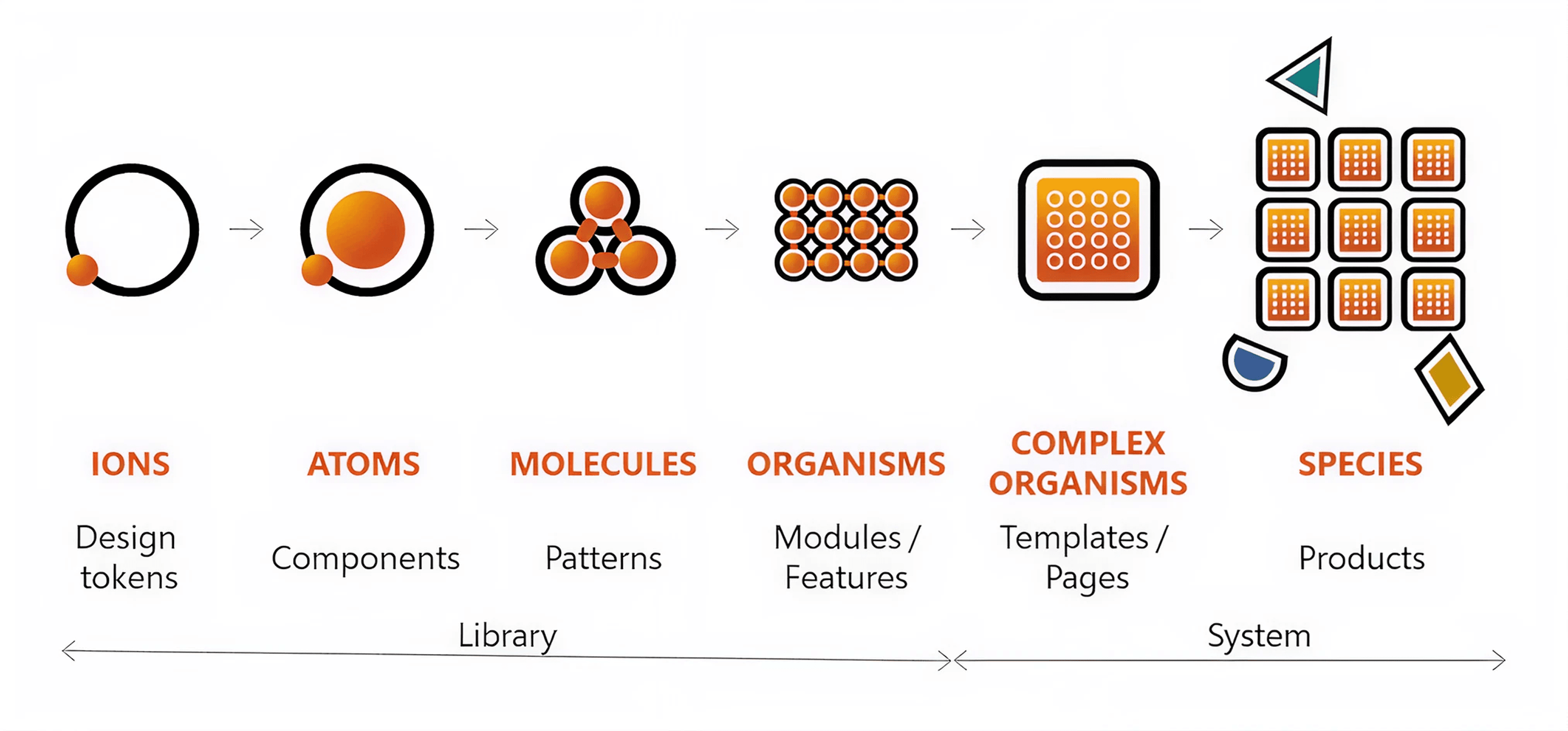
Atomic Design is a methodology for building interface systems through small, reusable components.
The concept borrows inspiration from chemistry, where atoms combine into molecules, molecules form organisms, and organisms create more complex structures.
Similarly, user interfaces are built from increasingly complex building blocks.
The five stages include:
Atoms
Molecules
Organisms
Templates
Pages
These stages work together rather than following a strict linear process.
1. Atoms
Atoms are the smallest functional elements of an interface.
Examples include:
Buttons
Input fields
Labels
Icons
Colors
Typography
Spacing tokens
Atoms should remain simple and highly reusable.
For example:
A Primary Button should not contain business logic. It simply defines appearance, states, accessibility, and interaction behavior.
2. Molecules
Molecules combine multiple atoms into a functional component.
Examples include:
Search Bar
Login Form
Product Card
Search Input with Button
A Search Bar might contain:
Input
Search Icon
Submit Button
Each element has a single responsibility, but together they perform a complete task.
3. Organisms
Organisms combine several molecules into larger interface sections.
Examples:
Website Header
Product Listing
Checkout Summary
Navigation Sidebar
User Profile Section
Unlike molecules, organisms often represent complete sections of an application.
They become reusable building blocks for entire layouts.
4. Templates
Templates define structure.
Instead of displaying final content, they determine where components should appear.
A Product Detail template may include:
Header
Gallery
Product Information
Reviews
Related Products
Footer
Templates help designers validate layout decisions before real content is introduced.
5. Pages
Pages represent the finished user experience.
Templates become real pages once actual content is added.
Pages help teams validate:
Content hierarchy
Accessibility
Responsive behavior
Visual consistency
User experience
Testing with realistic content often reveals problems that placeholder text cannot.
Why Atomic Design Matters Today
Modern products rarely exist on a single platform.
Users interact through:
Websites
Mobile apps
Tablets
Smart TVs
Wearables
Desktop applications
A reusable component system ensures every experience remains visually and functionally consistent.
This is exactly why most enterprise Design Systems follow Atomic Design principles—even if they use different terminology.
Atomic Design and Design Systems
Atomic Design is not a Design System.
Instead, it provides the architecture for building one.
A Design System usually includes:
Component Library
Design Tokens
Typography Rules
Color System
Accessibility Guidelines
Documentation
Interaction Patterns
Atomic Design organizes these assets into a scalable structure.
Using Atomic Design with Figma
Modern design teams commonly implement Atomic Design inside Figma.
A typical project structure might include
Foundations
├── Colors
├── Typography
├── Grid
├── Spacing

Atoms
├── Button
├── Icon
├── Badge

Molecules
├── Search Bar
├── Input Field
├── Card

Organisms
├── Header
├── Sidebar
├── Footer

Templates
├── Dashboard
├── Product Detail
├── Checkout

Pages
├── Home
├── Cart
├── Profile
This organization keeps large design files easier to navigate and maintain.
Benefits of Atomic Design
Adopting Atomic Design offers several long-term advantages:
Better design consistency
Faster development
Easier maintenance
Higher component reusability
Improved collaboration
Simplified onboarding
More scalable products
Stronger accessibility practices
As products evolve, these benefits become increasingly valuable.
Common Mistakes
Many teams misunderstand Atomic Design.
Common mistakes include:
Creating too many components
Building overly complex atoms
Ignoring documentation
Naming components inconsistently
Designing pages before components
Skipping accessibility considerations
Atomic Design succeeds only when supported by strong governance and documentation.
Best Practices
To maximize the value of Atomic Design:
Design reusable components first.
Keep components independent.
Document every component.
Define clear naming conventions.
Test components with real content.
Establish ownership for the Design System.
Review components regularly.
Avoid unnecessary variations.
When Atomic Design Isn't the Right Choice
Atomic Design isn't mandatory for every project.
Small marketing websites or temporary campaigns may not require a complete component architecture.
However, if your product is expected to grow, investing in reusable components early can significantly reduce future maintenance costs.
Final Thoughts
Atomic Design has remained relevant because it addresses a challenge that every growing product eventually faces: complexity.
Rather than thinking in isolated screens, it encourages teams to think in systems.
Whether you're building a startup MVP or managing an enterprise platform, organizing interfaces into reusable building blocks leads to more consistent experiences, faster development, and products that can evolve without becoming difficult to maintain.
Atomic Design is not just about components—it's about creating a shared language between designers, developers, and product teams that makes digital products easier to build, improve, and scale.